OverTheWire Bandit: Levels 6–11
Level 6 — Find across the whole filesystem
The goal of this level was similar to the previous one: use find to locate a file based on its metadata. The difference was that the file was no longer somewhere under the current directory — it could be anywhere on the system.
/ is the root of the filesystem, so starting find there causes it to walk through every directory the current user can access. The problem was that bandit5 did not have permission to enter many of those directories, so find printed a large number of Permission denied errors to stderr alongside the actual result.
To clean that up, I redirected stderr to /dev/null using 2>/dev/null. In Linux, file descriptor 2 represents stderr, which is separate from normal command output (stdout). /dev/null is a special device that silently discards anything written to it, so this hid the permission errors while leaving the real result visible.
This level was my first real exposure to stdout versus stderr as separate output streams. It seems like a small distinction, but once commands start operating across large parts of the filesystem, understanding where output is being sent becomes extremely useful.

Level 7 — Grep for a known word
This level introduced grep, which is one of the most useful Unix text-processing tools. The password was stored next to the word "millionth" inside a large text file, so instead of manually scrolling through the file, I searched for the known keyword directly.
grep scans a file line by line and prints any line containing the pattern it was given. In this case, searching for "millionth" immediately returned the line containing the password.
This level reinforced a pattern that shows up constantly in command-line work: if I know part of what I am looking for, searching is usually better than manually browsing. Tools like grep are faster, more precise, and scale much better once files become too large to inspect comfortably by hand.

Level 8 — The only line that appears once
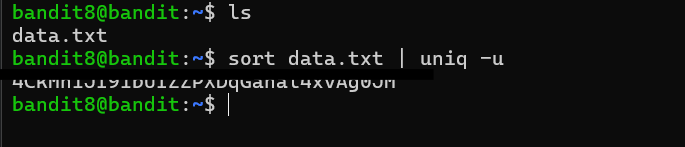
The goal of this level was to find the only line in the file that appeared exactly once. The main tool for this was uniq, but I learned that uniq has an important limitation: it only compares adjacent lines. It does not search the entire file for duplicates automatically.
Because of that, I had to sort the file first so that identical lines would be grouped together. Once the duplicates were adjacent, uniq -u printed only the lines that had no matching neighbor, leaving behind the single unique line that contained the password.
This level introduced one of the most common Unix command combinations: sort | uniq. The pipe (|) sends the output of sort directly into uniq, allowing the two programs to work together as a small processing pipeline. It is a simple pattern, but it shows up constantly in log analysis and text processing tasks where the goal is to identify repeated or unique entries quickly.
Level 9 — Strings from a binary blob
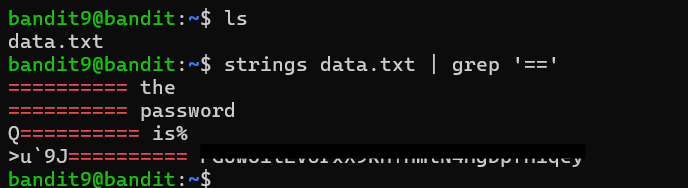
This level built on an earlier lesson about binary data and non-printable characters. Since the file was mostly non-human-readable data, directly printing it with cat would not have been very useful. Instead, I used the strings command, which extracts sequences of printable text from a file and displays them line by line.
I then piped the output of strings into grep to search for lines containing repeated = characters, matching the hint that the password was preceded by several equals signs. That narrowed the output down to only a few candidate lines, one of which contained the password immediately after a long sequence of = characters.
This level introduced a workflow that shows up frequently in binary analysis and reverse engineering: extract the readable portions first, then filter them down further with other text-processing tools. strings is especially useful because it allows me to inspect potentially useful text inside files that are otherwise unreadable in their raw form.
Level 10 — Base64
This level introduced Base64 encoding. Unlike encryption, Base64 is simply a way of representing binary or non-text data using printable ASCII characters so it can be transmitted safely through text-based systems.
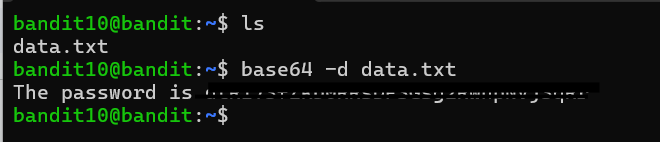
The base64 command can both encode and decode data depending on the flags used. In this case, the file contents were already Base64-encoded, so I used the -d flag to decode them back into their original form. Without -d, the command would have encoded the text again instead of decoding it.
I also started to recognize some of the visual patterns common in Base64 data. Base64 strings typically contain only uppercase letters, lowercase letters, numbers, +, and /, and their length is usually a multiple of four characters with optional = padding at the end. Once I knew those traits, Base64 became much easier to identify by sight. Decoding the file revealed a plain-text message containing the password for the next level.
Level 11 — ROT13
This level introduced ROT13, a simple substitution cipher where each letter is rotated 13 positions through the alphabet. For example, a becomes n, while n wraps back around to become a. Since the English alphabet contains 26 letters, applying ROT13 twice returns the original text, meaning the same transformation works for both encoding and decoding.
To decode the file, I used the Unix tr command, which performs character-by-character substitution. tr takes two character sets: the first specifies which characters to look for, and the second specifies what each matching character should become. In this case, the second alphabet was simply the normal alphabet rotated by 13 positions.
One detail I had to pay attention to was that uppercase and lowercase letters needed to be handled separately. Rotating only A-Z would leave all lowercase letters unchanged, so both ranges had to be included in the translation. Once the substitution was applied, the encoded text became readable and revealed the password for the next level.

This Weeks Takeaways
This batch felt less about learning isolated commands and more about learning how Unix tools fit together. Most of the levels followed the same pattern: take a large amount of data, narrow it down step by step, and pass the result into another tool. grep filtered by content, sort | uniq -u filtered by repetition, strings filtered out non-printable data, and tools like base64 and tr transformed encoded text back into something readable.
What stood out to me most was how composable the Unix command-line environment is. None of these tools solve especially complicated problems by themselves, but combining small tools together into pipelines makes it possible to answer surprisingly specific questions with very little code or manual effort.
Next the focus shifts from local text to talking to the system itself — compression layers, SSH keys, and network services in Bandit: Levels 12–17.